MQTT Connection
Disconnected
Broker
broker.hivemq.com:1883
Topic
GPS_TrackingB
Protocol
MQTT v3.1.1
QoS Level
0 (At most once)
WiFi SSID
Kawata Hotspot
Messages
0
Digital Compass
0°
N
0°
Sensor Akselerometer & Giroskop
Akselerometer X
0.000m/s²
Akselerometer Y
0.000m/s²
Akselerometer Z
0.000m/s²
Giroskop X
0.000rad/s
Giroskop Y
0.000rad/s
Giroskop Z
0.000rad/s
Sensor Tekanan & Ketinggian
Temperature
0.0°C
Pressure
0.00hPa
Altitude
0.0m
GPS Information
| Parameter | Value | Unit |
|---|---|---|
| Latitude | 0.000000 | ° |
| Longitude | 0.000000 | ° |
| Satellites | 0 | |
| HDOP | 0.00 | |
| Speed | 0.00 | km/h |
| Time | 00:00:00 | |
| Date | 01/01/00 |
ESP32 Sketch Program
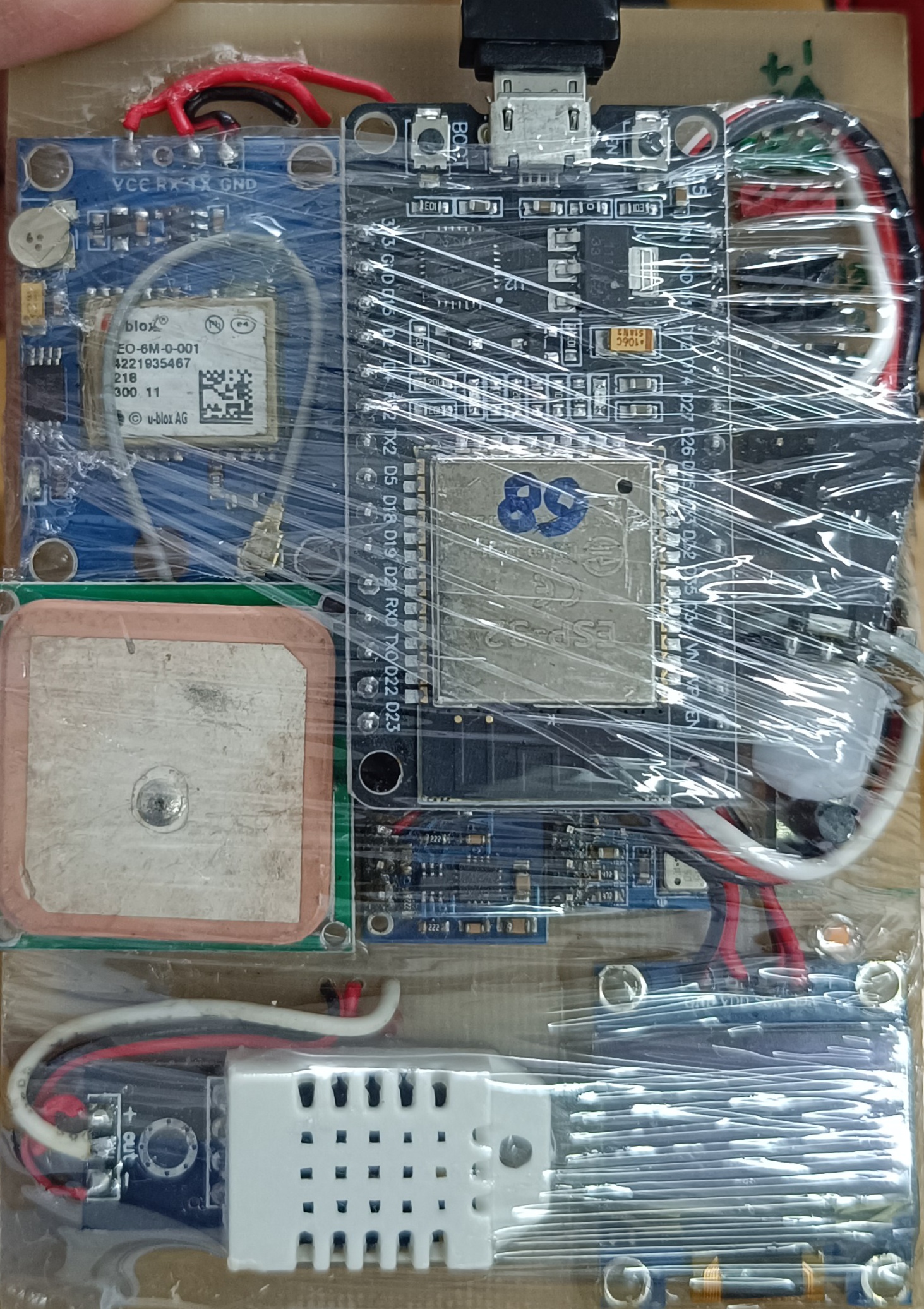
ESP32 Balance Robot - Klik gambar untuk memperbesar
/*
* ====================================================================================
* PROGRAM: ESP32 GPS TRACKER DENGAN SCANNING WIFI OTOMATIS DAN WEBSERVER
* ====================================================================================
*
* DESKRIPSI PROGRAM:
* Program ini adalah sistem pelacakan GPS multi-sensor yang terintegrasi dengan WiFi,
* dilengkapi dengan webserver untuk konfigurasi dan monitoring real-time. Sistem ini
* mampu melakukan scanning otomatis terhadap 4 jaringan WiFi dengan prioritas dan
* menampilkan data sensor melalui OLED display.
*
* FITUR UTAMA:
* 1. Scanning WiFi Otomatis dengan 4 prioritas SSID
* 2. Webserver AP dengan antarmuka konfigurasi yang modern
* 3. Display OLED untuk monitoring real-time data sensor
* 4. Multiple sensor: GPS, MPU6050, BMP180, DHT22, PIR (GPIO18)
* 5. Pengiriman data ke MQTT broker untuk monitoring remote
* 6. Penyimpanan pengaturan di EEPROM
* 7. NTP client untuk sinkronisasi waktu
*
* MONITORING ONLINE:
* Data yang dikirim ke MQTT dapat dimonitor melalui website:
* https://pandawatechno.com/dano/GPS_TrackingB.html
*
* SENSOR YANG DIGUNAKAN:
* - GPS: Ublox NEO-6M/7M/8M (Serial: RX=16, TX=17)
* - Accelerometer/Gyroscope: MPU6050 (I2C: SDA=21, SCL=22)
* - Barometer: BMP180 (I2C: SDA=21, SCL=22)
* - Temperature/Humidity: DHT22 (GPIO23)
* - PIR Motion Sensor: (GPIO18) - Deteksi gerakan manusia
* - OLED Display: SSD1306 128x64 (I2C: SDA=21, SCL=22, Address: 0x3C)
* - LED Indikator: GPIO4 (Active LOW)
* - Button: GPIO0 (untuk mode AP)
*
* WIFI PRIORITAS:
* 1. Kawata Hotspot (Prioritas 1)
* 2. DanZAIProject (Prioritas 2)
* 3. pintar (Prioritas 3)
* 4. TiGha (Prioritas 4)
*
* MQTT CONFIGURATION:
* - Server: broker.hivemq.com
* - Port: 1883
* - Topic (data): GPS_TrackingB
* - Topic (PIR): GPS_TrackingB/pir
*
* AUTHOR: DANO HP
* CONTACT: 083838995933
* DATE: 15 Februari 2024
* VERSION: 2.1 (Added PIR sensor)
*
* LISENSI: MIT License
* ====================================================================================
*/
#include <Wire.h>
#include <Adafruit_Sensor.h>
#include <Adafruit_MPU6050.h>
#include <Adafruit_BMP085.h>
#include <DHT.h>
#include <HardwareSerial.h>
#include <TinyGPS++.h>
#include <WiFi.h>
#include <PubSubClient.h>
#include <NTPClient.h>
#include <WiFiUdp.h>
#include <Adafruit_GFX.h>
#include <Adafruit_SSD1306.h>
#include <WebServer.h>
#include <EEPROM.h>
// ================== KONFIGURASI PIR ==================
#define PIR_PIN 18 // Pin GPIO18 untuk sensor PIR
#define PIR_ALERT_DURATION 3000 // Durasi tampilan alert di OLED (ms)
#define PIR_DEBOUNCE_MS 5000 // Debounce time untuk mengirim MQTT (ms)
volatile bool pirTriggered = false; // Flag interrupt
bool pirAlertActive = false; // Apakah alert sedang aktif
unsigned long pirAlertStart = 0; // Waktu mulai alert
unsigned long lastPirPublishTime = 0; // Waktu terakhir kirim MQTT (debounce)
// ================== KONFIGURASI OLED ==================
#define SCREEN_WIDTH 128
#define SCREEN_HEIGHT 64
#define OLED_RESET -1
#define SCREEN_ADDRESS 0x3C
Adafruit_SSD1306 display(SCREEN_WIDTH, SCREEN_HEIGHT, &Wire, OLED_RESET);
// ================== KONFIGURASI NTP ==================
WiFiUDP ntpUDP;
NTPClient timeClient(ntpUDP, "pool.ntp.org", 7 * 3600); // GMT+7
unsigned long lastNTPUpdate = 0;
const unsigned long NTP_UPDATE_INTERVAL = 60000; // Update setiap menit
// ================== KONFIGURASI WIFI ==================
// Struktur untuk kredensial WiFi dengan prioritas
struct WiFiCredential {
const char* ssid;
const char* password;
int priority;
};
// Daftar WiFi dengan urutan prioritas (1 = tertinggi, 4 = terendah)
WiFiCredential wifiList[] = {
{"Kawata Hotspot", "K1htsPt0123@!", 1}, // Prioritas 1
{"DanZAIProject", "pintar2022", 2}, // Prioritas 2
{"pintar", "pintar2022", 3}, // Prioritas 3
{"TiGha", "jsjNAXks9315", 4} // Prioritas 4
};
const int wifiCount = 4;
int currentWiFiIndex = 0;
bool wifiConnected = false;
unsigned long lastWiFiAttempt = 0;
const unsigned long WIFI_RETRY_INTERVAL = 10000; // 10 detik
unsigned long wifiScanStartTime = 0;
const unsigned long WIFI_SCAN_TIMEOUT = 30000; // 30 detik timeout
// ================== KONFIGURASI ACCESS POINT ==================
const char* ap_ssid = "Display GPS Tracker";
WebServer server(80);
// ================== KONFIGURASI EEPROM ==================
#define EEPROM_SIZE 64
#define SETTINGS_ADDR 0
struct DisplaySettings {
uint8_t pageDuration; // Durasi halaman dalam detik (1-10)
uint8_t autoScroll; // Auto scroll (0: Tidak, 1: Ya)
uint8_t showSeconds; // Tampilkan detik (0: Tidak, 1: Ya)
uint8_t pageOrder[6]; // Urutan halaman (0-5) - sekarang ada 6 halaman
uint8_t brightness; // Kecerahan (1-3)
uint8_t selectedPage; // Halaman yang dipilih untuk mode manual (0-5)
};
DisplaySettings settings;
// ================== KONFIGURASI MQTT ==================
const char* mqtt_server = "broker.hivemq.com";
const int mqtt_port = 1883;
const char* mqtt_topic = "GPS_TrackingB";
const char* mqtt_pir_topic = "GPS_TrackingB/pir";
WiFiClient espClient;
PubSubClient client(espClient);
// ================== INSTANSI SENSOR ==================
Adafruit_MPU6050 mpu;
Adafruit_BMP085 bmp;
// ================== KONFIGURASI DHT22 ==================
#define DHTPIN 23 // Pin GPIO23 untuk DHT22
#define DHTTYPE DHT22 // Tipe sensor DHT22
DHT dht(DHTPIN, DHTTYPE);
unsigned long lastDHTRead = 0;
const unsigned long DHT_READ_INTERVAL = 2000; // Baca setiap 2 detik
float dhtTemperature = 0.0;
float dhtHumidity = 0.0;
float dewPoint = 0.0;
// ================== INSTANSI GPS ==================
TinyGPSPlus gps;
HardwareSerial GPS_Serial(2);
// ================== VARIABEL DISPLAY ==================
const int MAX_LINES = 4;
const int START_Y = 24;
const int LINE_HEIGHT = 10;
const int TOTAL_PAGES = 6; // Sekarang ada 6 halaman
int currentPage = 0;
unsigned long lastPageChange = 0;
unsigned long pageChangeInterval = 5000; // Default 5 detik
// ================== KONFIGURASI LED ==================
#define LED_PIN 4 // GPIO4 untuk LED (active LOW)
unsigned long ledStartTime = 0;
bool ledBlinking = false;
const unsigned long LED_BLINK_DURATION = 10; // 20ms
// ================== KELAS KALMAN FILTER ==================
class KalmanFilter {
private:
float Q_angle = 0.001;
float Q_bias = 0.003;
float R_measure = 0.03;
float angle = 0.0;
float bias = 0.0;
float P[2][2] = {{0.0, 0.0}, {0.0, 0.0}};
public:
float update(float newAngle, float newRate, float dt) {
float rate = newRate - bias;
angle += dt * rate;
P[0][0] += dt * (dt * P[1][1] - P[0][1] - P[1][0] + Q_angle);
P[0][1] -= dt * P[1][1];
P[1][0] -= dt * P[1][1];
P[1][1] += Q_bias * dt;
float S = P[0][0] + R_measure;
float K[2];
K[0] = P[0][0] / S;
K[1] = P[1][0] / S;
float y = newAngle - angle;
angle += K[0] * y;
bias += K[1] * y;
float P00_temp = P[0][0];
float P01_temp = P[0][1];
P[0][0] -= K[0] * P00_temp;
P[0][1] -= K[0] * P01_temp;
P[1][0] -= K[1] * P00_temp;
P[1][1] -= K[1] * P01_temp;
return angle;
}
void setAngle(float newAngle) {
angle = newAngle;
}
};
// ================== FILTER KALMAN UNTUK SETIAP AXIS ==================
KalmanFilter kalmanX, kalmanY, kalmanZ;
// ================== VARIABEL GLOBAL ==================
float magX_filtered = 0.0, magY_filtered = 0.0, magZ_filtered = 0.0;
unsigned long lastMicros = 0;
const unsigned long MPU_SAMPLE_INTERVAL = 10000; // 10ms = 100Hz
float dt = 0.01;
float gyroBiasX = 0.0, gyroBiasY = 0.0, gyroBiasZ = 0.0;
const int CALIBRATION_SAMPLES = 500;
bool calibrated = false;
bool hasMPU6050 = false;
bool hasBMP180 = false;
bool hasDHT22 = false;
// ================== DATA SENSOR ==================
float accX = 0.0, accY = 0.0, accZ = 0.0;
float gyroX = 0.0, gyroY = 0.0, gyroZ = 0.0;
float mpuTemperature = 0.0;
float pressure = 0.0, bmpAltitude = 0.0, bmpTemperature = 0.0;
// ================== STRING DATA GPS ==================
char gpsData[150];
unsigned long lastMqttPublish = 0;
const unsigned long MQTT_PUBLISH_INTERVAL = 2000; // 2 seconds
// ================== VARIABEL UNTUK DISPLAY JAM ==================
unsigned long lastSecondUpdate = 0;
String currentTimeString = "";
// ================== VARIABEL UNTUK MODE AP ==================
bool apModeActive = false;
unsigned long apStartTime = 0;
const unsigned long AP_TIMEOUT = 300000; // 5 menit timeout untuk AP mode
// ================== FORWARD DECLARATIONS ==================
void updateTimeString();
void handleSave();
void handleRestart();
// ================== FUNGSI-FUNGSI UTAMA ==================
// Fungsi untuk menghitung titik embun (dew point)
float calculateDewPoint(float temperature, float humidity) {
// Formula Magnus: Td = (b * α(T,RH)) / (a - α(T,RH))
// Dimana α(T,RH) = (a * T) / (b + T) + ln(RH/100)
// Konstanta: a = 17.62, b = 243.12°C
float a = 17.62;
float b = 243.12;
float alpha = ((a * temperature) / (b + temperature)) + log(humidity / 100.0);
float dewPoint = (b * alpha) / (a - alpha);
return dewPoint;
}
// Fungsi untuk menyimpan pengaturan ke EEPROM
void saveSettings() {
EEPROM.put(SETTINGS_ADDR, settings);
EEPROM.commit();
Serial.println("Settings saved to EEPROM");
}
// Fungsi untuk membaca pengaturan dari EEPROM
void loadSettings() {
EEPROM.get(SETTINGS_ADDR, settings);
// Cek jika settingan belum pernah disimpan
if (settings.pageDuration < 1 || settings.pageDuration > 10) {
// Set default values
settings.pageDuration = 5; // 5 detik
settings.autoScroll = 1; // Auto scroll aktif
settings.showSeconds = 1; // Tampilkan detik
settings.brightness = 2; // Kecerahan medium
settings.selectedPage = 0; // Halaman pertama
// Default page order: 0,1,2,3,4,5 (sesuai urutan)
for (int i = 0; i < 6; i++) {
settings.pageOrder[i] = i;
}
saveSettings(); // Save default settings
}
// Update page change interval berdasarkan setting
pageChangeInterval = settings.pageDuration * 1000;
Serial.println("Settings loaded from EEPROM");
Serial.print("Page Duration: "); Serial.println(settings.pageDuration);
Serial.print("Auto Scroll: "); Serial.println(settings.autoScroll);
Serial.print("Show Seconds: "); Serial.println(settings.showSeconds);
Serial.print("Brightness: "); Serial.println(settings.brightness);
Serial.print("Selected Page: "); Serial.println(settings.selectedPage);
Serial.print("Page Order: ");
for (int i = 0; i < 6; i++) {
Serial.print(settings.pageOrder[i]); Serial.print(" ");
}
Serial.println();
}
// Fungsi untuk scanning otomatis WiFi dengan tampilan SSID di OLED
void scanAndConnectWiFi() {
Serial.println("Starting WiFi scanning and connection...");
if (apModeActive) {
// Dalam mode AP+STA, kita tetap bisa scan
WiFi.mode(WIFI_AP_STA);
} else {
WiFi.mode(WIFI_STA);
}
WiFi.disconnect();
delay(100);
// Tampilkan pesan scanning di OLED
display.clearDisplay();
display.setTextSize(1);
display.setCursor(0, 0);
display.println("Scanning WiFi...");
display.setCursor(0, 10);
display.println("Please wait...");
display.display();
// Scan jaringan WiFi yang tersedia
int networkCount = WiFi.scanNetworks();
Serial.print("Found ");
Serial.print(networkCount);
Serial.println(" networks");
// Tampilkan hasil scanning di OLED
display.clearDisplay();
display.setTextSize(1);
display.setCursor(0, 0);
display.print("Found ");
display.print(networkCount);
display.println(" networks");
// Tampilkan 3 jaringan pertama di OLED
int yPos = 10;
for (int i = 0; i < min(networkCount, 3); i++) {
display.setCursor(0, yPos);
display.print(i + 1);
display.print(": ");
display.println(WiFi.SSID(i).substring(0, 16)); // Batasi panjang SSID
yPos += 10;
}
// Jika ada lebih dari 3 jaringan, tampilkan indikator
if (networkCount > 3) {
display.setCursor(0, 40);
display.print("...and ");
display.print(networkCount - 3);
display.println(" more");
}
display.display();
delay(2000);
// Buat array untuk menyimpan SSID yang ditemukan
String foundSSIDs[networkCount];
int foundRSSI[networkCount];
for (int i = 0; i < networkCount; i++) {
foundSSIDs[i] = WiFi.SSID(i);
foundRSSI[i] = WiFi.RSSI(i);
Serial.print(i + 1);
Serial.print(": ");
Serial.print(foundSSIDs[i]);
Serial.print(" (");
Serial.print(foundRSSI[i]);
Serial.println(" dBm)");
}
// Coba koneksi sesuai urutan prioritas
bool connected = false;
for (int priority = 1; priority <= 4 && !connected; priority++) {
for (int i = 0; i < wifiCount; i++) {
if (wifiList[i].priority == priority) {
// Cek apakah SSID ini ada dalam jaringan yang ditemukan
bool ssidFound = false;
int ssidIndex = -1;
for (int j = 0; j < networkCount; j++) {
if (foundSSIDs[j] == wifiList[i].ssid) {
ssidFound = true;
ssidIndex = j;
break;
}
}
if (ssidFound) {
Serial.print("Attempting to connect to: ");
Serial.print(wifiList[i].ssid);
Serial.print(" (Priority: ");
Serial.print(priority);
Serial.print(", Signal: ");
Serial.print(foundRSSI[ssidIndex]);
Serial.println(" dBm)");
// Tampilkan SSID yang sedang dicoba di OLED
display.clearDisplay();
display.setTextSize(1);
display.setCursor(0, 0);
display.println("Connecting to:");
display.setCursor(0, 10);
display.print("SSID: ");
display.println(wifiList[i].ssid);
display.setCursor(0, 20);
display.print("Signal: ");
display.print(foundRSSI[ssidIndex]);
display.println(" dBm");
display.setCursor(0, 30);
display.print("Priority: ");
display.println(priority);
display.setCursor(0, 40);
display.println("Please wait...");
display.display();
WiFi.begin(wifiList[i].ssid, wifiList[i].password);
int attempts = 0;
while (WiFi.status() != WL_CONNECTED && attempts < 20) {
delay(500);
Serial.print(".");
attempts++;
// Update status di OLED
display.fillRect(0, 50, 128, 10, SSD1306_BLACK);
display.setCursor(0, 50);
display.print("Attempt: ");
display.print(attempts);
display.println("/20");
display.display();
}
if (WiFi.status() == WL_CONNECTED) {
Serial.println("");
Serial.println("WiFi connected!");
Serial.print("SSID: ");
Serial.println(WiFi.SSID());
Serial.print("IP address: ");
Serial.println(WiFi.localIP());
Serial.print("Signal strength: ");
Serial.print(WiFi.RSSI());
Serial.println(" dBm");
// Update variabel global
currentWiFiIndex = i;
wifiConnected = true;
connected = true;
// Update NTP
timeClient.begin();
timeClient.update();
updateTimeString();
// Tampilkan sukses di OLED dengan SSID yang terhubung
display.clearDisplay();
display.setTextSize(1);
display.setCursor(0, 0);
display.println("WiFi Connected!");
display.setCursor(0, 10);
display.print("SSID: ");
String connectedSSID = WiFi.SSID();
if (connectedSSID.length() > 16) {
display.println(connectedSSID.substring(0, 16));
display.setCursor(0, 20);
display.println(connectedSSID.substring(16, 32));
} else {
display.println(connectedSSID);
display.setCursor(0, 20);
display.print("IP: ");
display.println(WiFi.localIP());
}
display.setCursor(0, 30);
display.print("Signal: ");
display.print(WiFi.RSSI());
display.println(" dBm");
display.setCursor(0, 40);
display.print("Priority: ");
display.println(priority);
display.display();
delay(3000);
break; // Keluar dari loop
} else {
Serial.println("");
Serial.print("Failed to connect to: ");
Serial.println(wifiList[i].ssid);
// Tampilkan gagal di OLED
display.clearDisplay();
display.setTextSize(1);
display.setCursor(0, 0);
display.println("Connection Failed");
display.setCursor(0, 10);
display.print("SSID: ");
display.println(wifiList[i].ssid);
display.setCursor(0, 20);
display.println("Trying next...");
display.display();
delay(1000);
}
}
}
}
}
if (!connected) {
Serial.println("Could not connect to any WiFi network");
wifiConnected = false;
// Tampilkan pesan di OLED
display.clearDisplay();
display.setTextSize(1);
display.setCursor(0, 0);
display.println("WiFi Connection");
display.setCursor(0, 10);
display.println("Failed!");
display.setCursor(0, 20);
display.println("Available Networks:");
int yPos = 30;
for (int i = 0; i < min(networkCount, 3); i++) {
display.setCursor(0, yPos);
display.print("- ");
display.println(foundSSIDs[i].substring(0, 16));
yPos += 10;
}
display.display();
delay(3000);
}
WiFi.scanDelete();
}
// Fungsi untuk mencoba koneksi ulang WiFi
void reconnectWiFiIfNeeded() {
unsigned long currentMillis = millis();
if (WiFi.status() != WL_CONNECTED && !apModeActive) {
if (currentMillis - lastWiFiAttempt >= WIFI_RETRY_INTERVAL) {
lastWiFiAttempt = currentMillis;
Serial.println("WiFi disconnected. Attempting to reconnect...");
// Tampilkan pesan reconnecting di OLED
display.clearDisplay();
display.setTextSize(1);
display.setCursor(0, 0);
display.println("WiFi Disconnected");
display.setCursor(0, 10);
display.println("Reconnecting...");
display.display();
delay(1000);
scanAndConnectWiFi();
}
}
}
// Fungsi untuk mendapatkan info WiFi saat ini
String getCurrentWiFiInfo() {
if (WiFi.status() == WL_CONNECTED) {
String info = "SSID: ";
info += WiFi.SSID();
info += " (";
info += WiFi.RSSI();
info += " dBm)";
return info;
}
return "WiFi: Disconnected";
}
// Fungsi untuk memulai Access Point + STA mode
void startAccessPoint() {
Serial.println("Starting Access Point + STA mode...");
// Mulai Access Point dan STA mode secara bersamaan
WiFi.mode(WIFI_AP_STA);
// Coba koneksi WiFi STA terlebih dahulu
scanAndConnectWiFi();
// Mulai Access Point
WiFi.softAP(ap_ssid, NULL); // Tanpa password
IPAddress apIP = WiFi.softAPIP();
Serial.print("AP IP address: ");
Serial.println(apIP);
// Setup web server routes
server.on("/", handleRoot);
server.on("/save", handleSave);
server.on("/restart", handleRestart);
server.on("/reconnect", []() {
server.send(200, "text/html", "<!DOCTYPE html><html><head><meta name='viewport' content='width=device-width, initial-scale=1'><title>Reconnecting WiFi</title><style>body { font-family: 'Segoe UI', Tahoma, Geneva, Verdana, sans-serif; margin: 0; padding: 0; background: linear-gradient(135deg, #667eea 0%, #764ba2 100%); min-height: 100vh; display: flex; justify-content: center; align-items: center; } .container { max-width: 600px; background: white; padding: 40px; border-radius: 20px; box-shadow: 0 20px 60px rgba(0,0,0,0.3); text-align: center; animation: fadeIn 0.5s ease; } @keyframes fadeIn { from { opacity: 0; transform: translateY(-20px); } to { opacity: 1; transform: translateY(0); } } h2 { color: #333; margin-bottom: 20px; font-size: 28px; } p { color: #666; margin-bottom: 30px; font-size: 16px; line-height: 1.6; } .wifi-icon { font-size: 60px; margin-bottom: 20px; color: #4CAF50; animation: pulse 2s infinite; } @keyframes pulse { 0% { transform: scale(1); } 50% { transform: scale(1.1); } 100% { transform: scale(1); } }</style></head><body><div class='container'><div class='wifi-icon'>📶</div><h2>🔄 Reconnecting WiFi...</h2><p>Please wait while the device scans and connects to WiFi networks.</p><p>This will take about 10-20 seconds.</p><p>You will be redirected to the settings page in 10 seconds.</p></div><script>setTimeout(function(){ window.location.href = '/'; }, 10000);</script></body></html>");
delay(1000);
scanAndConnectWiFi();
delay(9000);
server.sendHeader("Location", "/", true);
server.send(302, "text/plain", "");
});
server.begin();
Serial.println("HTTP server started");
apModeActive = true;
apStartTime = millis();
// Tampilkan pesan di OLED dengan SSID yang terhubung
display.clearDisplay();
display.setTextSize(1);
display.setTextColor(SSD1306_WHITE);
display.setCursor(0, 0);
display.println("AP+STA Mode Active");
display.setCursor(0, 10);
display.print("AP SSID: ");
display.println(ap_ssid);
display.setCursor(0, 20);
display.print("AP IP: ");
display.println(apIP);
display.setCursor(0, 30);
if (WiFi.status() == WL_CONNECTED) {
display.print("Connected to: ");
String connectedSSID = WiFi.SSID();
if (connectedSSID.length() > 16) {
display.println(connectedSSID.substring(0, 16));
display.setCursor(0, 40);
display.println(connectedSSID.substring(16));
} else {
display.println(connectedSSID);
display.setCursor(0, 40);
display.print("Signal: ");
display.print(WiFi.RSSI());
display.println(" dBm");
}
} else {
display.println("WiFi: Searching...");
display.setCursor(0, 40);
display.println("Connect to AP to config");
}
display.display();
}
// Fungsi untuk halaman utama web dengan logo WiFi yang bagus
void handleRoot() {
String html = R"=====(
<!DOCTYPE html>
<html lang="en">
<head>
<meta charset="UTF-8">
<meta name="viewport" content="width=device-width, initial-scale=1.0">
<title>🌐 Display GPS Tracker Settings</title>
<style>
* {
margin: 0;
padding: 0;
box-sizing: border-box;
}
body {
font-family: 'Segoe UI', Tahoma, Geneva, Verdana, sans-serif;
background: linear-gradient(135deg, #667eea 0%, #764ba2 100%);
min-height: 100vh;
color: #333;
line-height: 1.6;
}
.container {
max-width: 1200px;
margin: 0 auto;
padding: 20px;
}
.header {
background: rgba(255, 255, 255, 0.95);
border-radius: 20px;
padding: 30px;
margin-bottom: 30px;
box-shadow: 0 10px 40px rgba(0,0,0,0.1);
display: flex;
align-items: center;
animation: slideDown 0.5s ease;
}
@keyframes slideDown {
from {
opacity: 0;
transform: translateY(-30px);
}
to {
opacity: 1;
transform: translateY(0);
}
}
.logo-container {
display: flex;
align-items: center;
margin-right: 30px;
}
.wifi-logo {
width: 80px;
height: 80px;
background: linear-gradient(45deg, #4CAF50, #2196F3);
border-radius: 50%;
display: flex;
align-items: center;
justify-content: center;
position: relative;
animation: pulse 2s infinite;
box-shadow: 0 5px 15px rgba(33, 150, 243, 0.4);
}
@keyframes pulse {
0% {
box-shadow: 0 5px 15px rgba(33, 150, 243, 0.4);
}
50% {
box-shadow: 0 5px 25px rgba(33, 150, 243, 0.7);
}
100% {
box-shadow: 0 5px 15px rgba(33, 150, 243, 0.4);
}
}
.wifi-logo::before {
content: '';
position: absolute;
width: 60px;
height: 60px;
border: 3px solid white;
border-radius: 50%;
opacity: 0.8;
}
.wifi-logo::after {
content: '';
position: absolute;
width: 40px;
height: 40px;
border: 3px solid white;
border-radius: 50%;
opacity: 0.6;
}
.wifi-icon {
position: relative;
z-index: 2;
color: white;
font-size: 24px;
font-weight: bold;
}
.title-container {
flex: 1;
}
.title-container h1 {
color: #2c3e50;
font-size: 32px;
margin-bottom: 10px;
background: linear-gradient(45deg, #2196F3, #4CAF50);
-webkit-background-clip: text;
-webkit-text-fill-color: transparent;
background-clip: text;
}
.title-container p {
color: #7f8c8d;
font-size: 16px;
}
.content {
display: grid;
grid-template-columns: 1fr 1fr;
gap: 30px;
}
@media (max-width: 768px) {
.content {
grid-template-columns: 1fr;
}
.header {
flex-direction: column;
text-align: center;
}
.logo-container {
margin-right: 0;
margin-bottom: 20px;
}
}
.card {
background: rgba(255, 255, 255, 0.95);
border-radius: 20px;
padding: 30px;
box-shadow: 0 10px 40px rgba(0,0,0,0.1);
animation: fadeIn 0.5s ease;
}
@keyframes fadeIn {
from {
opacity: 0;
transform: translateY(20px);
}
to {
opacity: 1;
transform: translateY(0);
}
}
.card h2 {
color: #2c3e50;
font-size: 24px;
margin-bottom: 25px;
padding-bottom: 15px;
border-bottom: 3px solid #2196F3;
display: flex;
align-items: center;
}
.card h2 i {
margin-right: 10px;
color: #2196F3;
}
.form-group {
margin-bottom: 25px;
}
.form-group label {
display: block;
margin-bottom: 8px;
color: #34495e;
font-weight: 600;
font-size: 15px;
}
.form-group select,
.form-group input[type="number"] {
width: 100%;
padding: 12px 15px;
border: 2px solid #e0e0e0;
border-radius: 10px;
font-size: 16px;
transition: all 0.3s;
background: white;
}
.form-group select:focus,
.form-group input[type="number"]:focus {
border-color: #2196F3;
outline: none;
box-shadow: 0 0 0 3px rgba(33, 150, 243, 0.1);
}
.radio-label {
display: flex;
align-items: center;
padding: 10px;
margin: 8px 0;
background: #f8f9fa;
border-radius: 10px;
transition: all 0.3s;
cursor: pointer;
}
.radio-label:hover {
background: #e3f2fd;
transform: translateX(5px);
}
.radio-label input {
margin-right: 15px;
transform: scale(1.2);
}
.status-box {
background: linear-gradient(135deg, #e3f2fd, #bbdefb);
padding: 25px;
border-radius: 15px;
margin-bottom: 25px;
border-left: 5px solid #2196F3;
}
.wifi-status {
background: linear-gradient(135deg, #e8f5e9, #c8e6c9);
padding: 25px;
border-radius: 15px;
margin-bottom: 25px;
border-left: 5px solid #4CAF50;
}
.connected {
color: #2e7d32;
font-weight: bold;
font-size: 18px;
display: flex;
align-items: center;
}
.connected::before {
content: "✓";
display: inline-block;
width: 24px;
height: 24px;
background: #4CAF50;
color: white;
border-radius: 50%;
text-align: center;
line-height: 24px;
margin-right: 10px;
}
.disconnected {
color: #c62828;
font-weight: bold;
font-size: 18px;
display: flex;
align-items: center;
}
.disconnected::before {
content: "✗";
display: inline-block;
width: 24px;
height: 24px;
background: #c62828;
color: white;
border-radius: 50%;
text-align: center;
line-height: 24px;
margin-right: 10px;
}
.btn {
display: inline-block;
padding: 14px 28px;
background: linear-gradient(45deg, #2196F3, #1976D2);
color: white;
border: none;
border-radius: 10px;
font-size: 16px;
font-weight: 600;
cursor: pointer;
transition: all 0.3s;
text-decoration: none;
text-align: center;
margin: 5px;
}
.btn:hover {
transform: translateY(-2px);
box-shadow: 0 10px 20px rgba(33, 150, 243, 0.3);
}
.btn-success {
background: linear-gradient(45deg, #4CAF50, #2E7D32);
}
.btn-warning {
background: linear-gradient(45deg, #ff9800, #f57c00);
}
.btn-danger {
background: linear-gradient(45deg, #f44336, #d32f2f);
}
.btn-group {
display: flex;
flex-wrap: wrap;
gap: 10px;
margin-top: 20px;
}
.system-info {
display: grid;
grid-template-columns: repeat(auto-fit, minmax(200px, 1fr));
gap: 15px;
margin-top: 15px;
}
.info-item {
background: white;
padding: 15px;
border-radius: 10px;
box-shadow: 0 3px 10px rgba(0,0,0,0.08);
}
.info-item strong {
display: block;
color: #555;
font-size: 14px;
margin-bottom: 5px;
}
.info-item span {
color: #2196F3;
font-weight: 600;
font-size: 16px;
}
.page-order-item {
background: white;
padding: 15px;
margin: 10px 0;
border-radius: 10px;
cursor: move;
border: 2px dashed #e0e0e0;
transition: all 0.3s;
display: flex;
align-items: center;
}
.page-order-item:hover {
border-color: #2196F3;
transform: translateX(5px);
}
.page-order-item::before {
content: "☰";
margin-right: 15px;
color: #2196F3;
font-size: 20px;
}
.wifi-list {
list-style: none;
padding: 0;
}
.wifi-list li {
background: white;
padding: 15px;
margin: 10px 0;
border-radius: 10px;
display: flex;
justify-content: space-between;
align-items: center;
box-shadow: 0 3px 10px rgba(0,0,0,0.08);
transition: all 0.3s;
}
.wifi-list li:hover {
transform: translateX(5px);
box-shadow: 0 5px 15px rgba(0,0,0,0.1);
}
.wifi-priority {
background: #2196F3;
color: white;
padding: 5px 12px;
border-radius: 20px;
font-size: 14px;
font-weight: bold;
}
.current-connection {
background: #4CAF50;
color: white;
padding: 5px 12px;
border-radius: 20px;
font-size: 14px;
font-weight: bold;
animation: pulse 2s infinite;
}
.loading {
display: inline-block;
width: 20px;
height: 20px;
border: 3px solid #f3f3f3;
border-top: 3px solid #2196F3;
border-radius: 50%;
animation: spin 1s linear infinite;
margin-right: 10px;
}
@keyframes spin {
0% { transform: rotate(0deg); }
100% { transform: rotate(360deg); }
}
.success-message {
background: linear-gradient(135deg, #e8f5e9, #c8e6c9);
color: #2e7d32;
padding: 20px;
border-radius: 10px;
margin: 20px 0;
text-align: center;
animation: slideIn 0.5s ease;
}
@keyframes slideIn {
from {
opacity: 0;
transform: translateX(-20px);
}
to {
opacity: 1;
transform: translateX(0);
}
}
.footer {
text-align: center;
margin-top: 40px;
padding: 20px;
color: white;
font-size: 14px;
opacity: 0.8;
}
.monitoring-link {
background: linear-gradient(45deg, #FF9800, #F57C00);
color: white;
padding: 15px 25px;
border-radius: 10px;
text-decoration: none;
display: inline-flex;
align-items: center;
margin-top: 15px;
transition: all 0.3s;
}
.monitoring-link:hover {
transform: translateY(-3px);
box-shadow: 0 10px 20px rgba(255, 152, 0, 0.3);
}
.monitoring-link i {
margin-right: 10px;
font-size: 20px;
}
</style>
</head>
<body>
<div class="container">
<div class="header">
<div class="logo-container">
<div class="wifi-logo">
<div class="wifi-icon">Wi-Fi</div>
</div>
</div>
<div class="title-container">
<h1>🌐 Display GPS Tracker Settings</h1>
<p>Wireless Configuration Panel | AP+STA Mode | Real-time Monitoring</p>
<p><strong>Author:</strong> DANO HP - 083838995933 | <strong>Date:</strong> 15 Februari 2024 | <strong>Version:</strong> 2.1 (with PIR Sensor)</p>
</div>
</div>
<!-- MONITORING LINK SECTION -->
<div class="card" style="text-align: center; margin-bottom: 30px;">
<h2><i>🌍</i> Real-time Monitoring</h2>
<p>View live GPS tracking data and sensor readings on the web dashboard:</p>
<a href="https://pandawatechno.com/dano/GPS_TrackingB.html" target="_blank" class="monitoring-link">
<i>📡</i> Open GPS Tracking Dashboard
</a>
<p style="margin-top: 15px; color: #666; font-size: 14px;">
Data is published to MQTT topics: <strong>GPS_TrackingB</strong> (sensor data) and <strong>GPS_TrackingB/pir</strong> (motion detection)
</p>
</div>
<div class="content">
<!-- Left Column: System Status and WiFi Info -->
<div>
<div class="card">
<h2><i>📊</i> System Status</h2>
<div class="system-info">
<div class="info-item">
<strong>AP IP Address</strong>
<span>)=====";
html += WiFi.softAPIP().toString();
html += R"=====(</span>
</div>
<div class="info-item">
<strong>STA IP Address</strong>
<span>)=====";
html += (WiFi.status() == WL_CONNECTED ? WiFi.localIP().toString() : "Not Connected");
html += R"=====(</span>
</div>
<div class="info-item">
<strong>MAC Address</strong>
<span>)=====";
html += WiFi.softAPmacAddress();
html += R"=====(</span>
</div>
<div class="info-item">
<strong>AP Clients</strong>
<span>)=====";
html += String(WiFi.softAPgetStationNum());
html += R"=====( Connected</span>
</div>
</div>
</div>
<div class="card">
<h2><i>📶</i> WiFi Connection Status</h2>
<div class="wifi-status">
)=====";
if (WiFi.status() == WL_CONNECTED) {
html += "<div class='connected'>✅ Connected to: <strong>" + String(WiFi.SSID()) + "</strong></div>";
html += R"=====(
<div class="system-info" style="margin-top: 15px;">
<div class="info-item">
<strong>Signal Strength</strong>
<span>)=====";
html += String(WiFi.RSSI()) + " dBm</span>";
html += R"=====(</div>
<div class="info-item">
<strong>IP Address</strong>
<span>)=====";
html += WiFi.localIP().toString() + "</span>";
html += R"=====(</div>
<div class="info-item">
<strong>Gateway</strong>
<span>)=====";
html += WiFi.gatewayIP().toString() + "</span>";
html += R"=====(</div>
<div class="info-item">
<strong>Subnet Mask</strong>
<span>)=====";
html += WiFi.subnetMask().toString() + "</span>";
html += R"=====(</div>
</div>
)=====";
} else {
html += "<div class='disconnected'>❌ WiFi Disconnected</div>";
html += "<p style='margin-top: 15px; color: #666;'>Device is currently in AP mode only. Connect to a WiFi network for full functionality.</p>";
}
html += R"=====(
</div>
<h3 style="margin-top: 25px; color: #555;">WiFi Priority List</h3>
<ol class="wifi-list">
)=====";
for (int i = 0; i < wifiCount; i++) {
html += "<li>";
html += "<span><strong>" + String(wifiList[i].ssid) + "</strong></span>";
html += "<div class='wifi-priority'>Priority " + String(wifiList[i].priority) + "</div>";
if (WiFi.status() == WL_CONNECTED && String(WiFi.SSID()) == String(wifiList[i].ssid)) {
html += "<div class='current-connection'>Currently Connected</div>";
}
html += "</li>";
}
html += R"=====(
</ol>
<div class="btn-group">
<form action="/reconnect" method="POST" style="display: inline;">
<button type="submit" class="btn btn-success">
<span class="loading"></span>🔄 Reconnect WiFi Now
</button>
</form>
<a href="/restart" class="btn btn-warning">🔄 Restart Device</a>
</div>
</div>
</div>
<!-- Right Column: Settings Form -->
<div>
<form action="/save" method="POST">
<div class="card">
<h2><i>⚙️</i> Display Settings</h2>
<div class="form-group">
<label for="pageDuration">📊 Page Duration (seconds, 1-10)</label>
<input type="number" id="pageDuration" name="pageDuration" min="1" max="10" value=")=====";
html += String(settings.pageDuration);
html += R"=====(">
</div>
<div class="form-group">
<label for="autoScroll">🔄 Auto Scroll Mode</label>
<select id="autoScroll" name="autoScroll" onchange="togglePageSelection()">
<option value="1")=====";
if (settings.autoScroll == 1) html += " selected";
html += R"=====(>Enabled</option>
<option value="0")=====";
if (settings.autoScroll == 0) html += " selected";
html += R"=====(>Disabled</option>
</select>
</div>
<div class="form-group">
<label for="showSeconds">⏰ Show Seconds in Clock</label>
<select id="showSeconds" name="showSeconds">
<option value="1")=====";
if (settings.showSeconds == 1) html += " selected";
html += R"=====(>Yes</option>
<option value="0")=====";
if (settings.showSeconds == 0) html += " selected";
html += R"=====(>No</option>
</select>
</div>
<div class="form-group">
<label for="brightness">💡 Display Brightness</label>
<select id="brightness" name="brightness">
<option value="1")=====";
if (settings.brightness == 1) html += " selected";
html += R"=====(>Low</option>
<option value="2")=====";
if (settings.brightness == 2) html += " selected";
html += R"=====(>Medium</option>
<option value="3")=====";
if (settings.brightness == 3) html += " selected";
html += R"=====(>High</option>
</select>
</div>
</div>
<div class="card" id="pageSelectionGroup" style=")=====";
if (settings.autoScroll == 0) {
html += "display: block;";
} else {
html += "display: none;";
}
html += R"=====(">
<h2><i>🎯</i> Manual Page Selection</h2>
<p>Select which page to display when auto scroll is disabled:</p>
)=====";
// Radio button untuk 6 pilihan halaman
String pageOptions[6] = {
"📍 GPS Data",
"📈 MPU6050 Data",
"🌡️ BMP180 Data",
"📶 Network Info",
"💧 DHT22 Data",
"📊 Combined Data"
};
String pageDescriptions[6] = {
"GPS coordinates, satellites, speed",
"Accelerometer, gyroscope, temperature",
"Pressure, altitude, temperature",
"WiFi status, IP addresses, MQTT",
"Temperature, humidity, dew point",
"Combined sensor data overview"
};
for (int i = 0; i < 6; i++) {
html += "<div class='radio-label'>";
html += "<input type='radio' id='page" + String(i) + "' name='selectedPage' value='" + String(i) + "'";
if (settings.selectedPage == i) html += " checked";
html += ">";
html += "<div>";
html += "<strong>" + pageOptions[i] + "</strong>";
html += "<div style='font-size: 14px; color: #666; margin-top: 3px;'>" + pageDescriptions[i] + "</div>";
html += "</div>";
html += "</div>";
}
html += R"=====(
</div>
<div class="card">
<h2><i>📋</i> Page Order Configuration</h2>
<p>Drag and drop pages to change display order (for auto scroll mode):</p>
)=====";
String pageNames[6] = {
"📍 GPS Data",
"📈 MPU6050 Data",
"🌡️ BMP180 Data",
"📶 Network Info",
"💧 DHT22 Data",
"📊 Combined Data"
};
for (int i = 0; i < 6; i++) {
html += "<div class='page-order-item'>";
html += "<input type='hidden' name='pageOrder" + String(i) + "' id='pageOrder" + String(i) + "' value='" + String(settings.pageOrder[i]) + "'>";
html += "<span style='margin-right: 10px; color: #2196F3; font-weight: bold;'>" + String(i + 1) + ".</span> ";
html += pageNames[settings.pageOrder[i]];
html += "</div>";
}
html += R"=====(
<p style="font-size: 14px; color: #666; margin-top: 15px;">
<strong>Note:</strong> Page order will be applied after saving. Changes take effect immediately.
</p>
</div>
<div class="card" style="text-align: center;">
<button type="submit" class="btn" style="padding: 18px 40px; font-size: 18px; width: 100%;">
💾 Save All Settings
</button>
<p style="margin-top: 15px; color: #666; font-size: 14px;">
Settings will be saved to EEPROM and applied immediately
</p>
</div>
</form>
</div>
</div>
<div class="footer">
<p>Display GPS Tracker v2.1 (PIR Sensor Added) | AP SSID: )=====";
html += ap_ssid;
html += R"=====( | © 2024 WiFi Configuration Panel</p>
<p>Connected to: )=====";
if (WiFi.status() == WL_CONNECTED) {
html += WiFi.SSID();
html += " | Signal: " + String(WiFi.RSSI()) + " dBm";
} else {
html += "AP Mode Only";
}
html += R"=====(</p>
<p><strong>Real-time Monitoring:</strong> <a href="https://pandawatechno.com/dano/GPS_TrackingB.html" target="_blank" style="color: white; text-decoration: underline;">https://pandawatechno.com/dano/GPS_TrackingB.html</a></p>
<p><strong>Author:</strong> DANO HP - 083838995933 | <strong>Date:</strong> 15 Februari 2024 | <strong>Version:</strong> 2.1</p>
</div>
</div>
<script>
function togglePageSelection() {
var autoScroll = document.getElementById('autoScroll').value;
var pageSelectionGroup = document.getElementById('pageSelectionGroup');
if (autoScroll === '0') {
pageSelectionGroup.style.display = 'block';
pageSelectionGroup.style.animation = 'fadeIn 0.5s ease';
} else {
pageSelectionGroup.style.animation = 'fadeIn 0.5s ease';
setTimeout(() => {
pageSelectionGroup.style.display = 'none';
}, 500);
}
}
// Drag and drop functionality for page order
document.addEventListener('DOMContentLoaded', function() {
const containers = document.querySelectorAll('.page-order-item');
containers.forEach(container => {
container.setAttribute('draggable', 'true');
container.addEventListener('dragstart', handleDragStart);
container.addEventListener('dragover', handleDragOver);
container.addEventListener('drop', handleDrop);
container.addEventListener('dragend', handleDragEnd);
});
});
let dragSrcEl = null;
function handleDragStart(e) {
dragSrcEl = this;
e.dataTransfer.effectAllowed = 'move';
e.dataTransfer.setData('text/html', this.innerHTML);
this.style.opacity = '0.4';
this.style.background = '#e3f2fd';
}
function handleDragOver(e) {
if (e.preventDefault) {
e.preventDefault();
}
e.dataTransfer.dropEffect = 'move';
return false;
}
function handleDrop(e) {
if (e.stopPropagation) {
e.stopPropagation();
}
if (dragSrcEl !== this) {
// Swap HTML content
const dragHTML = dragSrcEl.innerHTML;
const dropHTML = this.innerHTML;
// Extract hidden input values
const dragInput = dragSrcEl.querySelector('input');
const dropInput = this.querySelector('input');
// Swap content
dragSrcEl.innerHTML = dropHTML;
this.innerHTML = dragHTML;
// Swap hidden input values
const tempVal = dragInput.value;
dragInput.value = dropInput.value;
dropInput.value = tempVal;
// Re-add the hidden input to the swapped content
dragSrcEl.querySelector('.page-order-item')?.remove();
dragSrcEl.insertAdjacentHTML('afterbegin', '<input type=\"hidden\" name=\"pageOrder' +
dragSrcEl.querySelector('input').name.replace('pageOrder', '').replace(']', '') +
'\" value=\"' + dragInput.value + '\">');
this.querySelector('.page-order-item')?.remove();
this.insertAdjacentHTML('afterbegin', '<input type=\"hidden\" name=\"pageOrder' +
this.querySelector('input').name.replace('pageOrder', '').replace(']', '') +
'\" value=\"' + dropInput.value + '\">');
// Update numbers
updatePageNumbers();
}
return false;
}
function handleDragEnd() {
this.style.opacity = '';
this.style.background = '';
}
function updatePageNumbers() {
const items = document.querySelectorAll('.page-order-item');
items.forEach((item, index) => {
const span = item.querySelector('span');
if (span) {
span.textContent = (index + 1) + '.';
}
});
}
// Add some interactive effects
document.querySelectorAll('.btn').forEach(button => {
button.addEventListener('mouseenter', function() {
this.style.transform = 'translateY(-2px)';
});
button.addEventListener('mouseleave', function() {
this.style.transform = 'translateY(0)';
});
});
// Auto-refresh status every 30 seconds
setTimeout(() => {
window.location.reload();
}, 30000);
</script>
</body>
</html>
)=====";
server.send(200, "text/html", html);
}
// Fungsi untuk menyimpan pengaturan dengan tampilan yang lebih baik
void handleSave() {
if (server.method() == HTTP_POST) {
// Ambil nilai dari form
settings.pageDuration = server.arg("pageDuration").toInt();
settings.autoScroll = server.arg("autoScroll").toInt();
settings.showSeconds = server.arg("showSeconds").toInt();
settings.brightness = server.arg("brightness").toInt();
settings.selectedPage = server.arg("selectedPage").toInt();
// Ambil page order
for (int i = 0; i < 6; i++) {
settings.pageOrder[i] = server.arg("pageOrder" + String(i)).toInt();
}
// Validasi
if (settings.pageDuration < 1) settings.pageDuration = 1;
if (settings.pageDuration > 10) settings.pageDuration = 10;
if (settings.brightness < 1) settings.brightness = 1;
if (settings.brightness > 3) settings.brightness = 3;
if (settings.selectedPage < 0) settings.selectedPage = 0;
if (settings.selectedPage > 5) settings.selectedPage = 5;
// Simpan ke EEPROM
saveSettings();
// Update variabel
pageChangeInterval = settings.pageDuration * 1000;
// Jika auto scroll disabled, set currentPage ke selectedPage
if (settings.autoScroll == 0) {
currentPage = settings.selectedPage;
}
// Tampilkan halaman sukses dengan desain yang lebih baik
String html = R"=====(
<!DOCTYPE html>
<html lang="en">
<head>
<meta charset="UTF-8">
<meta name="viewport" content="width=device-width, initial-scale=1.0">
<meta http-equiv="refresh" content="5;url=/">
<title>✅ Settings Saved</title>
<style>
* {
margin: 0;
padding: 0;
box-sizing: border-box;
}
body {
font-family: 'Segoe UI', Tahoma, Geneva, Verdana, sans-serif;
background: linear-gradient(135deg, #667eea 0%, #764ba2 100%);
min-height: 100vh;
display: flex;
justify-content: center;
align-items: center;
color: #333;
}
.success-container {
background: rgba(255, 255, 255, 0.95);
border-radius: 25px;
padding: 50px;
text-align: center;
box-shadow: 0 20px 60px rgba(0,0,0,0.3);
max-width: 600px;
width: 90%;
animation: popIn 0.5s ease;
}
@keyframes popIn {
0% {
opacity: 0;
transform: scale(0.8);
}
100% {
opacity: 1;
transform: scale(1);
}
}
.success-icon {
width: 100px;
height: 100px;
background: linear-gradient(45deg, #4CAF50, #2E7D32);
border-radius: 50%;
display: flex;
align-items: center;
justify-content: center;
margin: 0 auto 30px;
animation: bounce 1s infinite alternate;
}
@keyframes bounce {
from {
transform: translateY(0);
}
to {
transform: translateY(-10px);
}
}
.success-icon span {
color: white;
font-size: 48px;
}
h2 {
color: #2e7d32;
font-size: 32px;
margin-bottom: 20px;
font-weight: 600;
}
p {
color: #555;
font-size: 18px;
margin-bottom: 30px;
line-height: 1.6;
}
.settings-summary {
background: #f8f9fa;
border-radius: 15px;
padding: 25px;
margin: 30px 0;
text-align: left;
}
.settings-summary h3 {
color: #2196F3;
margin-bottom: 15px;
font-size: 20px;
border-bottom: 2px solid #e0e0e0;
padding-bottom: 10px;
}
.setting-item {
display: flex;
justify-content: space-between;
padding: 10px 0;
border-bottom: 1px solid #e0e0e0;
}
.setting-item:last-child {
border-bottom: none;
}
.setting-label {
color: #555;
font-weight: 500;
}
.setting-value {
color: #2196F3;
font-weight: 600;
}
.btn-group {
display: flex;
justify-content: center;
gap: 20px;
margin-top: 30px;
flex-wrap: wrap;
}
.btn {
padding: 16px 32px;
border: none;
border-radius: 12px;
font-size: 16px;
font-weight: 600;
cursor: pointer;
transition: all 0.3s;
text-decoration: none;
display: inline-block;
}
.btn-primary {
background: linear-gradient(45deg, #2196F3, #1976D2);
color: white;
}
.btn-secondary {
background: linear-gradient(45deg, #4CAF50, #2E7D32);
color: white;
}
.btn:hover {
transform: translateY(-3px);
box-shadow: 0 10px 25px rgba(0,0,0,0.2);
}
.countdown {
margin-top: 25px;
color: #666;
font-size: 16px;
}
.countdown span {
color: #2196F3;
font-weight: bold;
font-size: 20px;
}
@media (max-width: 768px) {
.success-container {
padding: 30px;
}
.btn-group {
flex-direction: column;
}
.btn {
width: 100%;
margin-bottom: 10px;
}
}
</style>
</head>
<body>
<div class="success-container">
<div class="success-icon">
<span>✓</span>
</div>
<h2>✅ Settings Saved Successfully!</h2>
<p>Your configuration has been saved to EEPROM and will take effect immediately.</p>
<div class="settings-summary">
<h3>📋 Settings Applied</h3>
<div class="setting-item">
<span class="setting-label">Page Duration:</span>
<span class="setting-value">)=====";
html += String(settings.pageDuration) + " seconds</span>";
html += R"=====(</div>
<div class="setting-item">
<span class="setting-label">Auto Scroll:</span>
<span class="setting-value">)=====";
// PERBAIKAN DI SINI: Gunakan String() untuk conversion
html += String(settings.autoScroll == 1 ? "Enabled" : "Disabled") + "</span>";
html += R"=====(</div>
<div class="setting-item">
<span class="setting-label">Show Seconds:</span>
<span class="setting-value">)=====";
// PERBAIKAN DI SINI: Gunakan String() untuk conversion
html += String(settings.showSeconds == 1 ? "Yes" : "No") + "</span>";
html += R"=====(</div>
<div class="setting-item">
<span class="setting-label">Brightness:</span>
<span class="setting-value">)=====";
String brightnessText;
switch(settings.brightness) {
case 1: brightnessText = "Low"; break;
case 2: brightnessText = "Medium"; break;
case 3: brightnessText = "High"; break;
default: brightnessText = "Medium";
}
html += brightnessText + "</span>";
html += R"=====(</div>
<div class="setting-item">
<span class="setting-label">Selected Page:</span>
<span class="setting-value">)=====";
String pageNames[6] = {
"GPS Data", "MPU6050 Data", "BMP180 Data",
"Network Info", "DHT22 Data", "Combined Data"
};
html += pageNames[settings.selectedPage] + "</span>";
html += R"=====(</div>
</div>
<div class="countdown">
Redirecting to settings page in <span id="countdown">5</span> seconds...
</div>
<div class="btn-group">
<a href="/" class="btn btn-primary">⚙️ Back to Settings</a>
<a href="/restart" class="btn btn-secondary">🔄 Restart Device</a>
</div>
<div style="margin-top: 30px; padding: 15px; background: #e3f2fd; border-radius: 10px;">
<p style="color: #1976D2; font-size: 16px; margin: 0;">
<strong>📡 Real-time Monitoring:</strong> View live data at
<a href="https://pandawatechno.com/dano/GPS_TrackingB.html" target="_blank" style="color: #2196F3; text-decoration: underline;">
https://pandawatechno.com/dano/GPS_TrackingB.html
</a>
</p>
</div>
</div>
<script>
// Countdown timer
let seconds = 5;
const countdownElement = document.getElementById('countdown');
const countdownInterval = setInterval(() => {
seconds--;
countdownElement.textContent = seconds;
if (seconds <= 0) {
clearInterval(countdownInterval);
window.location.href = '/';
}
}, 1000);
// Add some animations to buttons
document.querySelectorAll('.btn').forEach(button => {
button.addEventListener('mouseenter', function() {
this.style.transform = 'translateY(-3px) scale(1.05)';
});
button.addEventListener('mouseleave', function() {
this.style.transform = 'translateY(0) scale(1)';
});
});
</script>
</body>
</html>
)=====";
server.send(200, "text/html", html);
} else {
server.send(405, "text/plain", "Method Not Allowed");
}
}
// Fungsi untuk restart device dengan tampilan yang lebih baik
void handleRestart() {
String html = R"=====(
<!DOCTYPE html>
<html lang="en">
<head>
<meta charset="UTF-8">
<meta name="viewport" content="width=device-width, initial-scale=1.0">
<meta http-equiv="refresh" content="7;url=/">
<title>🔄 Restarting Device</title>
<style>
* {
margin: 0;
padding: 0;
box-sizing: border-box;
}
body {
font-family: 'Segoe UI', Tahoma, Geneva, Verdana, sans-serif;
background: linear-gradient(135deg, #667eea 0%, #764ba2 100%);
min-height: 100vh;
display: flex;
justify-content: center;
align-items: center;
color: #333;
}
.restart-container {
background: rgba(255, 255, 255, 0.95);
border-radius: 25px;
padding: 50px;
text-align: center;
box-shadow: 0 20px 60px rgba(0,0,0,0.3);
max-width: 600px;
width: 90%;
animation: slideUp 0.5s ease;
}
@keyframes slideUp {
from {
opacity: 0;
transform: translateY(30px);
}
to {
opacity: 1;
transform: translateY(0);
}
}
.restart-icon {
width: 120px;
height: 120px;
background: linear-gradient(45deg, #2196F3, #1976D2);
border-radius: 50%;
display: flex;
align-items: center;
justify-content: center;
margin: 0 auto 30px;
animation: spin 2s linear infinite;
}
@keyframes spin {
0% {
transform: rotate(0deg);
}
100% {
transform: rotate(360deg);
}
}
.restart-icon span {
color: white;
font-size: 48px;
}
h2 {
color: #1976D2;
font-size: 32px;
margin-bottom: 20px;
font-weight: 600;
}
p {
color: #555;
font-size: 18px;
margin-bottom: 25px;
line-height: 1.6;
}
.progress-container {
width: 100%;
height: 20px;
background: #e0e0e0;
border-radius: 10px;
margin: 30px 0;
overflow: hidden;
}
.progress-bar {
height: 100%;
background: linear-gradient(90deg, #4CAF50, #2E7D32);
width: 0%;
border-radius: 10px;
animation: progress 7s linear forwards;
}
@keyframes progress {
from {
width: 0%;
}
to {
width: 100%;
}
}
.status-messages {
text-align: left;
background: #f8f9fa;
border-radius: 15px;
padding: 20px;
margin: 30px 0;
}
.status-item {
display: flex;
align-items: center;
padding: 10px 0;
border-bottom: 1px solid #e0e0e0;
animation: fadeInItem 0.5s ease forwards;
opacity: 0;
}
.status-item:last-child {
border-bottom: none;
}
.status-item:nth-child(1) { animation-delay: 0.5s; }
.status-item:nth-child(2) { animation-delay: 1.5s; }
.status-item:nth-child(3) { animation-delay: 2.5s; }
.status-item:nth-child(4) { animation-delay: 3.5s; }
@keyframes fadeInItem {
to {
opacity: 1;
}
}
.status-icon {
width: 30px;
height: 30px;
background: #2196F3;
border-radius: 50%;
display: flex;
align-items: center;
justify-content: center;
margin-right: 15px;
color: white;
font-size: 14px;
}
.status-text {
color: #555;
font-size: 16px;
}
.countdown {
margin-top: 25px;
color: #666;
font-size: 16px;
}
.countdown span {
color: #2196F3;
font-weight: bold;
font-size: 20px;
}
@media (max-width: 768px) {
.restart-container {
padding: 30px;
}
}
</style>
</head>
<body>
<div class="restart-container">
<div class="restart-icon">
<span>↻</span>
</div>
<h2>🔄 Restarting Device...</h2>
<p>Please wait while the device restarts. This process will take a few moments.</p>
<div class="progress-container">
<div class="progress-bar"></div>
</div>
<div class="status-messages">
<div class="status-item">
<div class="status-icon">1</div>
<div class="status-text">Saving current configuration to EEPROM</div>
</div>
<div class="status-item">
<div class="status-icon">2</div>
<div class="status-text">Stopping WiFi services</div>
</div>
<div class="status-item">
<div class="status-icon">3</div>
<div class="status-text">Rebooting system components</div>
</div>
<div class="status-item">
<div class="status-icon">4</div>
<div class="status-text">Initializing sensors and WiFi</div>
</div>
</div>
<div class="countdown">
You will be redirected to the settings page in <span id="countdown">7</span> seconds
</div>
<p style="margin-top: 20px; font-size: 14px; color: #777;">
Note: The AP SSID "Display GPS Tracker" will be available again shortly.
</p>
<div style="margin-top: 25px; padding: 15px; background: #e3f2fd; border-radius: 10px;">
<p style="color: #1976D2; font-size: 16px; margin: 0;">
<strong>📡 After restart:</strong> View live GPS data at
<a href="https://pandawatechno.com/dano/GPS_TrackingB.html" target="_blank" style="color: #2196F3; text-decoration: underline;">
https://pandawatechno.com/dano/GPS_TrackingB.html
</a>
</p>
</div>
</div>
<script>
// Countdown timer
let seconds = 7;
const countdownElement = document.getElementById('countdown');
const countdownInterval = setInterval(() => {
seconds--;
countdownElement.textContent = seconds;
if (seconds <= 0) {
clearInterval(countdownInterval);
}
}, 1000);
// Add some interactive animations
document.querySelectorAll('.status-item').forEach((item, index) => {
setTimeout(() => {
item.style.opacity = '1';
item.style.transform = 'translateX(0)';
}, index * 1000 + 500);
});
</script>
</body>
</html>
)=====";
server.send(200, "text/html", html);
delay(2000);
ESP.restart();
}
// Helper function to update time string with seconds
void updateTimeString() {
// Format time as HH:MM:SS
int hours = timeClient.getHours();
int minutes = timeClient.getMinutes();
int seconds = timeClient.getSeconds();
char timeBuffer[9]; // HH:MM:SS\0
sprintf(timeBuffer, "%02d:%02d:%02d", hours, minutes, seconds);
currentTimeString = String(timeBuffer);
}
// ================== FUNGSI DISPLAY UNTUK SETIAP HALAMAN ==================
void displayGPSData() {
int yPos = START_Y;
if (gps.location.isValid()) {
// Line 1: Latitude
display.setCursor(0, yPos);
display.print("Lat:");
display.print(gps.location.lat(), 6);
yPos += LINE_HEIGHT;
// Line 2: Longitude
display.setCursor(0, yPos);
display.print("Lon:");
display.print(gps.location.lng(), 6);
yPos += LINE_HEIGHT;
// Line 3: Satellites and Speed
display.setCursor(0, yPos);
display.print("Sat:");
display.print(gps.satellites.value());
display.print(" Spd:");
display.print(gps.speed.kmph(), 1);
display.print("km/h");
yPos += LINE_HEIGHT;
// Line 4: HDOP and Time
display.setCursor(0, yPos);
display.print("HDOP:");
display.print(gps.hdop.hdop(), 1);
display.print(" T:");
if (gps.time.isValid()) {
display.printf("%02d:%02d", gps.time.hour(), gps.time.minute());
} else {
display.print("--:--");
}
} else {
display.setCursor(0, yPos);
display.print("GPS: Searching...");
yPos += LINE_HEIGHT;
display.setCursor(0, yPos);
display.print("Sat:");
display.print(gps.satellites.value());
}
}
void displayMPUData() {
int yPos = START_Y;
if (hasMPU6050) {
// Line 1: Accelerometer X, Y
display.setCursor(0, yPos);
display.print("AccX:");
display.print(accX, 1);
display.print(" Y:");
display.print(accY, 1);
yPos += LINE_HEIGHT;
// Line 2: Accelerometer Z and Temperature
display.setCursor(0, yPos);
display.print("AccZ:");
display.print(accZ, 1);
display.print(" T:");
display.print(mpuTemperature, 1);
display.write(247); // Simbol derajat
display.print("C");
yPos += LINE_HEIGHT;
// Line 3: Gyroscope X, Y
display.setCursor(0, yPos);
display.print("GyrX:");
display.print(gyroX, 1);
display.print(" Y:");
display.print(gyroY, 1);
yPos += LINE_HEIGHT;
// Line 4: Gyroscope Z
display.setCursor(0, yPos);
display.print("GyrZ:");
display.print(gyroZ, 1);
} else {
display.setCursor(0, yPos);
display.print("MPU6050: Not Found");
}
}
void displayBMPData() {
int yPos = START_Y;
if (hasBMP180) {
// Line 1: Pressure
display.setCursor(0, yPos);
display.print("Pressure:");
display.print(pressure, 1);
display.print("hPa");
yPos += LINE_HEIGHT;
// Line 2: Altitude
display.setCursor(0, yPos);
display.print("Altitude:");
display.print(bmpAltitude, 1);
display.print("m");
yPos += LINE_HEIGHT;
// Line 3: Temperature
display.setCursor(0, yPos);
display.print("Temp:");
display.print(bmpTemperature, 1);
display.write(247); // Simbol derajat
display.print("C");
yPos += LINE_HEIGHT;
// Line 4: Sensor Status
display.setCursor(0, yPos);
display.print("BMP180: OK");
} else {
display.setCursor(0, yPos);
display.print("BMP180: Not Found");
}
}
void displayDHTData() {
int yPos = START_Y;
if (hasDHT22) {
// Line 1: Title
display.setCursor(0, yPos);
display.print("DHT22 Sensor Data");
yPos += LINE_HEIGHT;
// Line 2: Temperature
display.setCursor(0, yPos);
display.print("Suhu Udara:");
display.print(dhtTemperature, 1);
display.write(247); // Simbol derajat
display.print("C");
yPos += LINE_HEIGHT;
// Line 3: Humidity
display.setCursor(0, yPos);
display.print("Kelembaban:");
display.print(dhtHumidity, 1);
display.print("%");
yPos += LINE_HEIGHT;
// Line 4: Dew Point
display.setCursor(0, yPos);
display.print("Dew Point:");
display.print(dewPoint, 1);
display.write(247); // Simbol derajat
display.print("C");
} else {
display.setCursor(0, yPos);
display.print("DHT22: Not Found");
}
}
void displayNetworkInfo() {
int yPos = START_Y;
// Line 1: WiFi Status dengan SSID
display.setCursor(0, yPos);
display.print("WiFi: ");
if (WiFi.status() == WL_CONNECTED) {
display.print("Connected");
yPos += LINE_HEIGHT;
// Line 2: SSID yang terhubung
display.setCursor(0, yPos);
display.print("SSID: ");
String ssid = WiFi.SSID();
if (ssid.length() > 14) {
display.println(ssid.substring(0, 14));
display.setCursor(0, yPos + 10);
display.println(ssid.substring(14));
yPos += LINE_HEIGHT; // Extra line untuk SSID panjang
} else {
display.println(ssid);
}
yPos += LINE_HEIGHT;
// Line 3: Signal strength
display.setCursor(0, yPos);
display.print("Signal: ");
display.print(WiFi.RSSI());
display.print(" dBm");
yPos += LINE_HEIGHT;
// Line 4: AP Status atau IP Address
display.setCursor(0, yPos);
display.print("AP: ");
display.print(apModeActive ? "Active" : "Inactive");
} else {
display.println("Searching...");
yPos += LINE_HEIGHT;
display.setCursor(0, yPos);
display.println("Scanning networks");
yPos += LINE_HEIGHT;
display.setCursor(0, yPos);
display.print("AP: ");
display.print(apModeActive ? "Active" : "Inactive");
display.print(" (");
display.print(WiFi.softAPgetStationNum());
display.print(")");
}
}
void displayCombinedData() {
int yPos = START_Y;
// Line 1: GPS Coordinates (jika valid)
display.setCursor(0, yPos);
if (gps.location.isValid()) {
display.print("Lat:");
display.print(gps.location.lat(), 4);
} else {
display.print("GPS: No Signal");
}
yPos += LINE_HEIGHT;
// Line 2: GPS Info
display.setCursor(0, yPos);
if (gps.location.isValid()) {
display.print("Lon:");
display.print(gps.location.lng(), 4);
} else {
display.print("Sat:");
display.print(gps.satellites.value());
}
yPos += LINE_HEIGHT;
// Line 3: DHT22 Temperature
display.setCursor(0, yPos);
display.print("Temp:");
display.print(dhtTemperature, 1);
display.write(247); // Simbol derajat
display.print("C Hum:");
display.print(dhtHumidity, 0);
display.print("%");
yPos += LINE_HEIGHT;
// Line 4: WiFi Status atau Pressure
display.setCursor(0, yPos);
if (WiFi.status() == WL_CONNECTED) {
display.print("WiFi: ");
String ssid = WiFi.SSID();
if (ssid.length() > 8) {
display.print(ssid.substring(0, 8));
} else {
display.print(ssid);
}
} else if (hasBMP180) {
display.print("P:");
display.print(pressure, 0);
display.print("hPa");
} else {
display.print("WiFi: Offline");
}
}
// Fungsi untuk mengirim alert PIR via MQTT
void sendPirAlertMqtt() {
if (WiFi.status() == WL_CONNECTED && client.connected()) {
if (client.publish(mqtt_pir_topic, "HUMAN_DETECTED")) {
Serial.println("PIR alert published to MQTT: HUMAN_DETECTED");
} else {
Serial.println("Failed to publish PIR alert to MQTT");
}
} else {
Serial.println("MQTT not connected, cannot send PIR alert");
}
}
// ISR untuk deteksi PIR
void IRAM_ATTR pirISR() {
pirTriggered = true;
}
void updateDisplay() {
// Clear display
display.clearDisplay();
// Jika alert PIR aktif dan belum timeout, tampilkan pesan HUMAN DETECTED
if (pirAlertActive && (millis() - pirAlertStart < PIR_ALERT_DURATION)) {
display.setTextSize(2);
display.setCursor(0, 20);
display.println("HUMAN DETECTED");
display.display();
return; // Keluar, tidak menampilkan halaman normal
} else {
pirAlertActive = false; // Hentikan alert setelah timeout
}
// Display NTP time with large font
display.setTextSize(2);
display.setCursor(0, 0);
// Format waktu berdasarkan setting
if (settings.showSeconds) {
// Tampilkan HH:MM:SS
display.print(currentTimeString);
} else {
// Tampilkan HH:MM saja
int hours = timeClient.getHours();
int minutes = timeClient.getMinutes();
char timeBuffer[6];
sprintf(timeBuffer, "%02d:%02d", hours, minutes);
display.print(timeBuffer);
}
// Display page indicator - moved to far right and without parentheses
display.setTextSize(1);
// Calculate position based on page number length
// Format: "X/Y" (1-2 digits for current page, 1 digit for total pages)
String pageIndicator = String(currentPage + 1) + "/" + String(TOTAL_PAGES);
int indicatorWidth = pageIndicator.length() * 6; // Each character is 6 pixels wide in size 1
// Position at far right (128 - width)
display.setCursor(128 - indicatorWidth, 0);
display.print(pageIndicator);
// Display sensor data starting from pixel 24
display.setTextSize(1);
// Get actual page to display based on page order
int actualPage = settings.pageOrder[currentPage];
// Jika auto scroll disabled, gunakan selectedPage
if (settings.autoScroll == 0) {
actualPage = settings.selectedPage;
}
// Display different content based on actual page
switch(actualPage) {
case 0: // Page 1: GPS Data
displayGPSData();
break;
case 1: // Page 2: MPU6050 Data
displayMPUData();
break;
case 2: // Page 3: BMP180 Data
displayBMPData();
break;
case 3: // Page 4: Network Info
displayNetworkInfo();
break;
case 4: // Page 5: DHT22 Data
displayDHTData();
break;
case 5: // Page 6: Combined Data
displayCombinedData();
break;
}
display.display();
}
void calibrateGyro() {
float sumX = 0.0, sumY = 0.0, sumZ = 0.0;
for (int i = 0; i < CALIBRATION_SAMPLES; i++) {
sensors_event_t a, g, temp;
if (mpu.getEvent(&a, &g, &temp)) {
sumX += g.gyro.x;
sumY += g.gyro.y;
sumZ += g.gyro.z;
}
delay(5);
}
gyroBiasX = sumX / CALIBRATION_SAMPLES;
gyroBiasY = sumY / CALIBRATION_SAMPLES;
gyroBiasZ = sumZ / CALIBRATION_SAMPLES;
calibrated = true;
}
void reconnectMQTT() {
while (!client.connected() && WiFi.status() == WL_CONNECTED) {
Serial.print("Attempting MQTT connection...");
String clientId = "ESP32Client-";
clientId += String(random(0xffff), HEX);
if (client.connect(clientId.c_str())) {
Serial.println("connected!");
client.subscribe(mqtt_topic);
} else {
Serial.print("failed, rc=");
Serial.print(client.state());
Serial.println(" try again in 5 seconds");
delay(5000);
}
}
}
void mqttCallback(char* topic, byte* payload, unsigned int length) {
// Handle incoming MQTT messages if needed
Serial.print("Message arrived [");
Serial.print(topic);
Serial.print("]: ");
String message = "";
for (int i = 0; i < length; i++) {
message += (char)payload[i];
}
Serial.println(message);
}
// ================== SETUP ==================
void setup(void) {
Serial.begin(115200);
// Tampilkan informasi program di Serial Monitor
Serial.println("\n\n==========================================");
Serial.println("PROGRAM: ESP32 GPS TRACKER DENGAN SCANNING WIFI OTOMATIS");
Serial.println("AUTHOR: DANO HP - 083838995933");
Serial.println("DATE: 15 Februari 2024");
Serial.println("VERSION: 2.1 (Added PIR Sensor)");
Serial.println("==========================================");
Serial.println("MONITORING WEBSITE: https://pandawatechno.com/dano/GPS_TrackingB.html");
Serial.println("==========================================\n");
// Initialize EEPROM
EEPROM.begin(EEPROM_SIZE);
loadSettings();
// Initialize LED Pin
pinMode(LED_PIN, OUTPUT);
digitalWrite(LED_PIN, HIGH); // Active LOW, jadi set HIGH untuk matikan
// Inisialisasi PIR sensor
pinMode(PIR_PIN, INPUT_PULLDOWN);
attachInterrupt(digitalPinToInterrupt(PIR_PIN), pirISR, RISING);
Serial.println("PIR sensor initialized on GPIO18");
// Initialize OLED
if(!display.begin(SSD1306_SWITCHCAPVCC, SCREEN_ADDRESS)) {
Serial.println(F("SSD1306 allocation failed"));
for(;;);
}
// Set brightness based on settings
if (settings.brightness == 1) {
display.dim(true);
} else if (settings.brightness == 3) {
display.ssd1306_command(SSD1306_SETCONTRAST);
display.ssd1306_command(0xFF);
}
// Clear display buffer
display.clearDisplay();
display.display();
delay(100);
// Display startup message
display.setTextSize(1);
display.setTextColor(SSD1306_WHITE);
display.setCursor(0, 0);
display.println(F("System Starting..."));
display.println(F("Scanning WiFi..."));
display.display();
// Cek button untuk masuk ke AP+STA mode (gunakan GPIO0 jika ada button)
pinMode(0, INPUT_PULLUP);
delay(100);
// Jika button GPIO0 ditekan selama startup, langsung ke AP+STA mode
if (digitalRead(0) == LOW) {
Serial.println("Button pressed. Starting AP+STA mode...");
startAccessPoint();
} else {
// Coba koneksi WiFi dengan scanning otomatis
scanAndConnectWiFi();
// Mulai AP+STA mode untuk selalu bisa diakses via AP
startAccessPoint();
}
// Jika terkoneksi WiFi, lanjutkan inisialisasi normal
// Initialize NTP (hanya jika STA terkoneksi)
if (WiFi.status() == WL_CONNECTED) {
timeClient.begin();
timeClient.update();
updateTimeString();
} else {
// Gunakan waktu default
updateTimeString();
}
// Initialize I2C
Wire.begin(21, 22);
Wire.setClock(100000);
// Initialize MPU6050
display.clearDisplay();
display.setCursor(0, 0);
display.print(F("Initializing MPU6050..."));
display.display();
if (mpu.begin()) {
hasMPU6050 = true;
mpu.setAccelerometerRange(MPU6050_RANGE_8_G);
mpu.setGyroRange(MPU6050_RANGE_500_DEG);
mpu.setFilterBandwidth(MPU6050_BAND_21_HZ);
calibrateGyro();
kalmanX.setAngle(0);
kalmanY.setAngle(0);
kalmanZ.setAngle(0);
display.println(F("OK"));
} else {
display.println(F("FAILED"));
}
display.display();
// Initialize BMP180
display.setCursor(0, 10);
display.print(F("Initializing BMP180..."));
display.display();
if (bmp.begin()) {
hasBMP180 = true;
display.println(F("OK"));
} else {
display.println(F("FAILED"));
}
display.display();
// Initialize DHT22
display.setCursor(0, 20);
display.print(F("Initializing DHT22..."));
display.display();
dht.begin();
delay(2000); // Beri waktu untuk DHT22 inisialisasi
// Test reading DHT22
float testTemp = dht.readTemperature();
float testHum = dht.readHumidity();
if (!isnan(testTemp) && !isnan(testHum)) {
hasDHT22 = true;
display.println(F("OK"));
} else {
display.println(F("FAILED"));
}
display.display();
// Initialize GPS
display.setCursor(0, 30);
display.print(F("Initializing GPS..."));
display.display();
GPS_Serial.begin(9600, SERIAL_8N1, 16, 17);
display.println(F("OK"));
display.display();
// Setup MQTT
display.setCursor(0, 40);
display.print(F("Setting up MQTT..."));
display.display();
client.setServer(mqtt_server, mqtt_port);
client.setCallback(mqttCallback);
display.println(F("OK"));
display.display();
// LED test blink
Serial.println("Testing LED...");
digitalWrite(LED_PIN, LOW); // LED ON (active LOW) - 20ms
delay(20);
digitalWrite(LED_PIN, HIGH); // LED OFF
delay(100);
digitalWrite(LED_PIN, LOW); // LED ON - 20ms
delay(20);
digitalWrite(LED_PIN, HIGH); // LED OFF
delay(100);
delay(2000);
// Tampilkan status akhir di OLED
display.clearDisplay();
display.setTextSize(1);
display.setCursor(0, 0);
display.println(F("System Ready!"));
display.setCursor(0, 10);
display.print(F("AP SSID: "));
display.println(ap_ssid);
if (WiFi.status() == WL_CONNECTED) {
display.setCursor(0, 20);
display.print("Connected to:");
display.setCursor(0, 30);
String ssid = WiFi.SSID();
if (ssid.length() > 16) {
display.println(ssid.substring(0, 16));
display.setCursor(0, 40);
display.println(ssid.substring(16));
} else {
display.println(ssid);
display.setCursor(0, 40);
display.print("Signal: ");
display.print(WiFi.RSSI());
display.println(" dBm");
}
} else {
display.setCursor(0, 20);
display.println("WiFi: Not Connected");
display.setCursor(0, 30);
display.println("Using AP Mode Only");
}
display.display();
delay(1000);
Serial.println("\n==========================================");
Serial.println("SYSTEM READY!");
Serial.println("==========================================");
Serial.print("AP SSID: "); Serial.println(ap_ssid);
Serial.print("AP IP: "); Serial.println(WiFi.softAPIP());
if (WiFi.status() == WL_CONNECTED) {
Serial.print("Connected to WiFi: "); Serial.println(WiFi.SSID());
Serial.print("STA IP: "); Serial.println(WiFi.localIP());
}
Serial.println("Webserver started. Access via AP or STA IP");
Serial.println("Monitoring website: https://pandawatechno.com/dano/GPS_TrackingB.html");
Serial.println("PIR sensor active on GPIO18");
Serial.println("==========================================\n");
}
// ================== LOOP ==================
void loop() {
unsigned long currentMicros = micros();
unsigned long currentMillis = millis();
// Handle web server (selalu aktif dalam mode AP)
server.handleClient();
// Cek timeout AP mode (5 menit) - hanya restart jika AP mode saja
if (apModeActive && (currentMillis - apStartTime >= AP_TIMEOUT)) {
Serial.println("AP mode timeout. Restarting...");
ESP.restart();
}
// Cek dan reconnect WiFi jika diperlukan
reconnectWiFiIfNeeded();
// Update NTP time periodically jika STA terkoneksi
if (WiFi.status() == WL_CONNECTED && currentMillis - lastNTPUpdate >= NTP_UPDATE_INTERVAL) {
timeClient.update();
updateTimeString(); // Update time string after NTP update
lastNTPUpdate = currentMillis;
}
// Update time string every second for seconds display
if (currentMillis - lastSecondUpdate >= 1000) {
updateTimeString();
lastSecondUpdate = currentMillis;
}
// Read DHT22 every 2 seconds
if (currentMillis - lastDHTRead >= DHT_READ_INTERVAL && hasDHT22) {
lastDHTRead = currentMillis;
// Read temperature and humidity from DHT22
float newTemp = dht.readTemperature();
float newHum = dht.readHumidity();
// Check if readings are valid
if (!isnan(newTemp) && !isnan(newHum)) {
dhtTemperature = newTemp;
dhtHumidity = newHum;
// Calculate dew point
dewPoint = calculateDewPoint(dhtTemperature, dhtHumidity);
}
}
// Read GPS
while (GPS_Serial.available() > 0) {
gps.encode(GPS_Serial.read());
}
// Read MPU6050 at 100Hz
if (currentMicros - lastMicros >= MPU_SAMPLE_INTERVAL && hasMPU6050) {
lastMicros = currentMicros;
sensors_event_t a, g, temp;
if (mpu.getEvent(&a, &g, &temp)) {
accX = a.acceleration.x;
accY = a.acceleration.y;
accZ = a.acceleration.z;
gyroX = g.gyro.x - gyroBiasX;
gyroY = g.gyro.y - gyroBiasY;
gyroZ = g.gyro.z - gyroBiasZ;
mpuTemperature = temp.temperature;
// Calculate angles
float accAngleX = atan2(accY, sqrt(accZ * accZ + accX * accX)) * 180.0 / PI;
float accAngleY = atan2(-accX, sqrt(accZ * accZ + accY * accY)) * 180.0 / PI;
float accAngleZ = atan2(sqrt(accX * accX + accY * accY), accZ) * 180.0 / PI;
float gyroRateX = gyroX * 57.2958;
float gyroRateY = gyroY * 57.2958;
float gyroRateZ = gyroZ * 57.2958;
float kalmanAngleX = kalmanX.update(accAngleX, gyroRateX, dt);
float kalmanAngleY = kalmanY.update(accAngleY, gyroRateY, dt);
float kalmanAngleZ = kalmanZ.update(accAngleZ, gyroRateZ, dt);
// Simulate magnetometer data
magX_filtered = sin(kalmanAngleX * PI / 180.0) * 50.0;
magY_filtered = sin(kalmanAngleY * PI / 180.0) * 50.0;
magZ_filtered = cos(kalmanAngleZ * PI / 180.0) * 50.0;
static unsigned long counter = 0;
magX_filtered += sin(counter * 0.005) * 1.0;
magY_filtered += cos(counter * 0.007) * 1.0;
magZ_filtered += sin(counter * 0.008 + 0.5) * 1.0;
counter++;
}
}
// Read BMP180
if (hasBMP180) {
pressure = bmp.readPressure() / 100.0; // hPa
bmpAltitude = bmp.readAltitude();
bmpTemperature = bmp.readTemperature();
}
// Handle LED blinking (non-blocking)
if (ledBlinking && (currentMillis - ledStartTime >= LED_BLINK_DURATION)) {
digitalWrite(LED_PIN, HIGH); // Matikan LED (active LOW) setelah 20ms
ledBlinking = false;
}
// Handle PIR detection (non-interrupt context)
if (pirTriggered) {
pirTriggered = false; // Clear flag
// Debounce: hindari pengiriman terlalu sering
if (currentMillis - lastPirPublishTime > PIR_DEBOUNCE_MS) {
lastPirPublishTime = currentMillis;
// Aktifkan alert pada OLED
pirAlertActive = true;
pirAlertStart = currentMillis;
// Kirim via MQTT
sendPirAlertMqtt();
// LED blink for detection (optional)
digitalWrite(LED_PIN, LOW);
ledBlinking = true;
ledStartTime = currentMillis;
Serial.println("PIR motion detected!");
} else {
Serial.println("PIR motion detected but debounced (too frequent)");
}
}
// Handle MQTT connection (hanya jika STA terkoneksi)
if (WiFi.status() == WL_CONNECTED) {
if (!client.connected()) {
reconnectMQTT();
}
client.loop();
// Publish data to MQTT every 2 seconds
if (currentMillis - lastMqttPublish >= MQTT_PUBLISH_INTERVAL) {
lastMqttPublish = currentMillis;
if (gps.location.isValid()) {
// Format: $GPS_TrackingB,lat,lon,satellites,hdop,speed,time,date,accX,accY,accZ,gyroX,gyroY,gyroZ,temp,pressure,altitude,heading
// Calculate heading from magnetometer (simulated)
float heading = atan2(magY_filtered, magX_filtered) * 180.0 / PI;
if (heading < 0) heading += 360.0;
sprintf(gpsData, "$GPS_TrackingB,%.6f,%.6f,%d,%.2f,%.2f,%02d%02d%02d,%02d%02d%02d,%.3f,%.3f,%.3f,%.3f,%.3f,%.3f,%.1f,%.2f,%.2f,%.1f,%.1f,%.1f,%.1f",
gps.location.lat(),
gps.location.lng(),
gps.satellites.value(),
gps.hdop.hdop(),
gps.speed.kmph(),
gps.time.hour(),
gps.time.minute(),
gps.time.second(),
gps.date.day(),
gps.date.month(),
gps.date.year() % 100, // Last 2 digits of year
accX, accY, accZ,
gyroX, gyroY, gyroZ,
bmpTemperature,
pressure,
bmpAltitude,
heading,
dhtTemperature,
dhtHumidity,
dewPoint
);
} else {
// Default data if GPS not valid
float heading = atan2(magY_filtered, magX_filtered) * 180.0 / PI;
if (heading < 0) heading += 360.0;
sprintf(gpsData, "$GPS_TrackingB,0.000000,0.000000,0,0.00,0.00,000000,010100,%.3f,%.3f,%.3f,%.3f,%.3f,%.3f,%.1f,%.2f,%.2f,%.1f,%.1f,%.1f,%.1f",
accX, accY, accZ,
gyroX, gyroY, gyroZ,
bmpTemperature,
pressure,
bmpAltitude,
heading,
dhtTemperature,
dhtHumidity,
dewPoint
);
}
// Publish to MQTT
if (client.publish(mqtt_topic, gpsData)) {
Serial.print("Published to MQTT: ");
Serial.println(gpsData);
// Aktifkan LED blink (20ms)
digitalWrite(LED_PIN, LOW); // LED ON (active LOW)
ledBlinking = true;
ledStartTime = currentMillis;
} else {
Serial.println("Failed to publish to MQTT");
}
}
}
// Update display
updateDisplay();
// Change page automatically every X seconds (berdasarkan setting)
if (settings.autoScroll && currentMillis - lastPageChange >= pageChangeInterval) {
currentPage = (currentPage + 1) % TOTAL_PAGES;
lastPageChange = currentMillis;
}
// Cek jika button ditekan untuk toggle antara AP+STA mode dan STA only
if (digitalRead(0) == LOW) {
delay(50); // Debounce
if (digitalRead(0) == LOW) {
Serial.println("Button pressed. Toggling AP mode...");
if (apModeActive) {
// Matikan AP mode, tetap STA only
WiFi.mode(WIFI_STA);
apModeActive = false;
Serial.println("AP mode disabled, STA only mode");
} else {
// Aktifkan AP+STA mode
startAccessPoint();
}
delay(500); // Delay untuk debounce
}
}
}